
FUSE
1. Obtain the FlexSDS DPFS Package
Request the FlexSDS DPFS installation package from the FlexSDS team.
2. Install FlexSDS DPFS
On CentOS / Rocky Linux:
bash
rpm -ivh flexsds-7.0.0-1.el8.x86_64.rpm
On Debian / Ubuntu:
bash
dpkg -i flexsds-dpfs-7.0.0_amd64.deb
Expected Output:
text
Selecting previously unselected package flexsds-dpfs.
(Reading database ... 234860 files and directories currently installed.)
Preparing to unpack flexsds-dpfs-7.0.0_amd64.deb ...
Unpacking flexsds-dpfs (7.0.0-1) ...
Setting up flexsds-dpfs (7.0.0-1) ...
3. Mount the DFS Using FUSE
Foreground Mount
bash
/opt/flexdpfs/bin/flexfuse -p pool1 -d dfs1 /mnt/tmp
Parameters:
-por--stor_pool– FlexSDS storage pool name-dor--dfs– FlexSDS DFS name/mnt/tmp– Mount point
4. Deploy FUSE as a System Service
View Usage
bash
/opt/flexdpfs/bin/flexfuseadm -h
Usage:
text
/opt/flexdpfs/bin/flexfuseadm [OPTIONS]
   -t, --type        Service type (install | uninstall)
   -n, --name        Service name
   -p, --stor_pool   Storage pool
   -d, --dfs         DFS name
   -c, --core        Core option
   -m, --mount       Mount point
   -h, --help        Show help
Install FUSE Service
bash
/opt/flexdpfs/bin/flexfuseadm -t install -n dfs1 -p test -d dfs1 -c -1 -m /mnt/tmp
Expected Output:
text
installing flexfuse service
Created symlink /etc/systemd/system/sysinit.target.wants/dfs1.service → /etc/systemd/system/dfs1.service.
5. Verify Service Status
bash
service dfs1 status
Example Output:
text
dfs1.service - FlexSDS FUSE daemon
      Loaded: loaded (/etc/systemd/system/dfs1.service; enabled)
      Active: active (running)
      Main PID: 35909 (flexfuse)
      Memory: 66.5M
      CPU: 19.037s
Verify Mount Point
bash
mount
text
flexfuse on /mnt/tmp type fuse.flexfuse (rw,nosuid,nodev,relatime,user_id=0,group_id=0)
I/O Performance Testing
FIO Test Configuration
[global]
 runtime=36000
 time_based
 group_reporting
 direct=1
 size=2G
 bs=4k
 ioengine=libaio
 rw=randrw
 numjobs=8
 iodepth=64
 rwmixread=0
[test]
 filename=/mnt/tmp/test.bin
Test Results
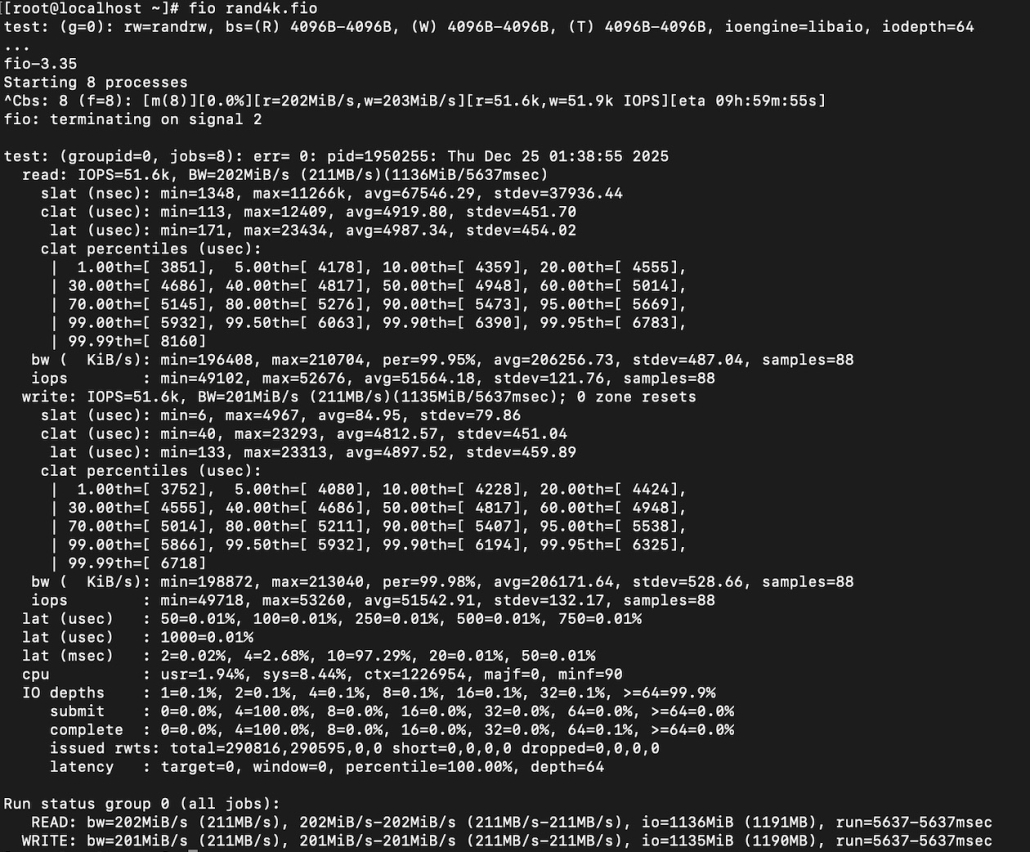
Using this configuration, the system achieves approximately 100,000 IOPS for 4K random read/write workloads by using only one CPU core, even though user can get more performance via NFS RDMA or Native API.
Performance Considerations
FUSE has inherent performance limitations due to its user-space design. For AI workloads and other performance-critical applications, FlexSDS recommends:
- NFS over RDMA, or
- FlexSDS Native API
These interfaces bypass FUSE limitations and deliver significantly higher throughput and lower latency.
For additional details, please refer to the FUSE Limitations section of the documentation.
If you want, I can also:
- Convert this into step-by-step quick-start documentation
- Create a troubleshooting section
- Provide a performance comparison table (FUSE vs NFS vs Native API)